No products in the cart.
 Bakery Equipment
 Food processing machine
 Packaging equipment
 Food packaging materials
 Commercial kitchen equipments
Customer support
Maintenance and Repair Services
At Automicom, we are committed to providing reliable after-sales service to keep your equipment operating efficiently. Our repair and maintenance services are available for both Automicom products and selected third-party equipment, subject to the terms below.
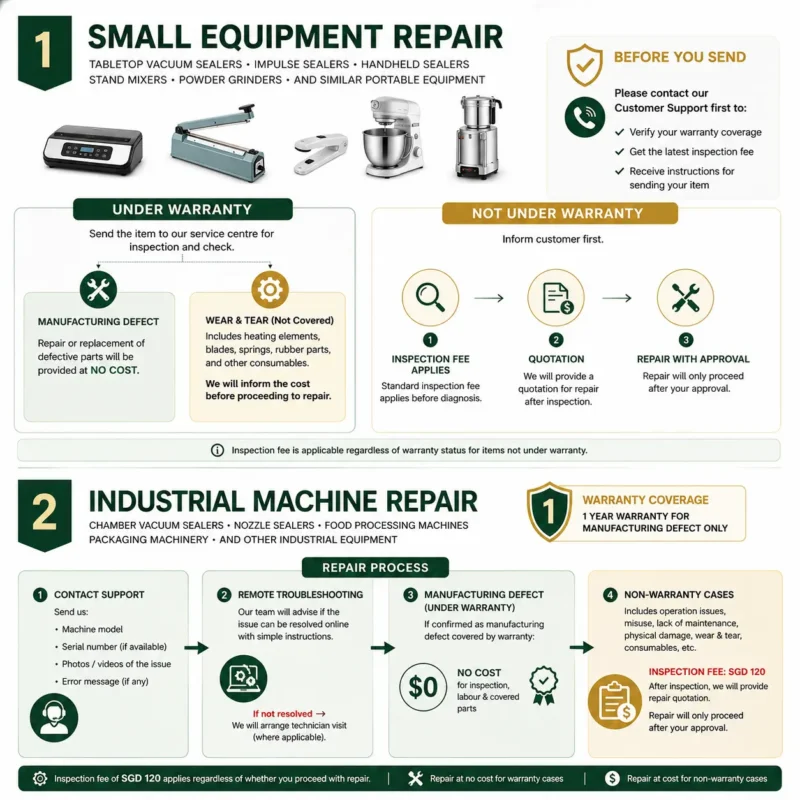
1. Small Equipment Repair
Applicable Products
- Tabletop vacuum sealers
- Handheld vacuum sealers
- Impulse sealers
- Stand mixers
- Powder grinders
- Similar portable equipment
Products Under Warranty
If your product is still within the warranty period, please send the unit to our service centre for inspection.
After inspection:
- Manufacturing Defect
- Repair or replacement of defective parts will be provided at no cost.
- Wear & Tear Components
The warranty does not cover consumable or wear parts, including but not limited to:- Heating elements
- Blades
- Springs
- Rubber parts
- Other consumable components
If replacement is required, we will provide a quotation for your approval before proceeding.
Products Out of Warranty
For products outside the warranty period:
- A standard inspection fee applies before diagnosis.
- After inspection, we will provide a quotation for repair.
- Repair work will only begin after receiving your approval.
Before sending your equipment, please contact our Customer Support team to:
- Verify your warranty coverage.
- Obtain the latest inspection fee.
- Receive instructions for sending your equipment to our service centre.
2. Industrial Machine Repair
Applicable Products
- Chamber vacuum sealers
- Nozzle vacuum sealers
- Food processing machines
- Packaging machinery
- Other industrial equipment supplied by Automicom
Warranty Coverage
Industrial machines include a 1-year warranty covering manufacturing defects only.
Repair Process
If your machine experiences an issue:
Step 1 – Contact Customer Support
Please send:
- Machine model
- Serial number (if available)
- Photos or videos clearly showing the issue
- Error message (if applicable)
Step 2 – Remote Troubleshooting
Our technical support team will first determine whether the issue can be resolved remotely through troubleshooting instructions.
If the issue cannot be resolved remotely, we will arrange an on-site technician visit where applicable.
Manufacturing Defect
If the fault is confirmed to be caused by a manufacturing defect and is covered under warranty:
- Inspection
- Labour
- Replacement of covered defective parts
will be provided at no cost.
Non-Warranty Repairs
The following are generally not covered under warranty:
- Incorrect operation
- Improper installation
- Lack of maintenance
- Physical damage
- Normal wear and tear
- Consumable components
For non-warranty cases:
- A standard inspection fee applies.
- After inspection, we will provide a repair quotation.
- Repair work will only proceed upon customer approval.
The inspection fee remains payable regardless of whether you decide to proceed with the repair.
3. Repair Service for Non-Automicom Equipment
We may be able to repair selected machines that were not purchased from Automicom.
Each case will be assessed individually.
Our engineers will review:
- Machine model
- Brand
- Availability of spare parts
- Photos and videos of the issue
- Repair feasibility
If we are able to support the repair:
- We will provide a quotation for inspection and repair.
If spare parts are unavailable or the repair is beyond our service capability, we may decline the repair request.
4. Preventive Maintenance Service
Regular preventive maintenance helps reduce unexpected downtime and extends the lifespan of your equipment.
We offer maintenance programs for most industrial machinery, including:
- Quarterly Maintenance
- Half-Yearly Maintenance
- Annual Maintenance
Our preventive maintenance service may include:
- General machine inspection
- Electrical and mechanical checks
- Cleaning and lubrication
- Replacement recommendations for wear parts
- Performance testing
- Safety inspection
- Maintenance report and service recommendations
When purchasing a new machine, our Customer Support team can recommend a preventive maintenance schedule based on your operating environment and production requirements.
5. Before Requesting Service
To ensure a smooth repair process, please prepare the following information:
- Machine model
- Purchase invoice or order number (if available)
- Serial number (if applicable)
- Description of the issue
- Photos or videos showing the problem
Our Customer Support team will advise the next steps and confirm whether the machine should be sent to our service centre or if on-site service is recommended.
Need Assistance?
If you require repair, maintenance, or technical support, please contact Automicom Customer Support before sending your equipment. Our team will help verify your warranty status, advise on inspection fees, and recommend the most suitable service solution.